
The Ultimate Guide to Converting WD USB PCBs to SATA for Data Recovery
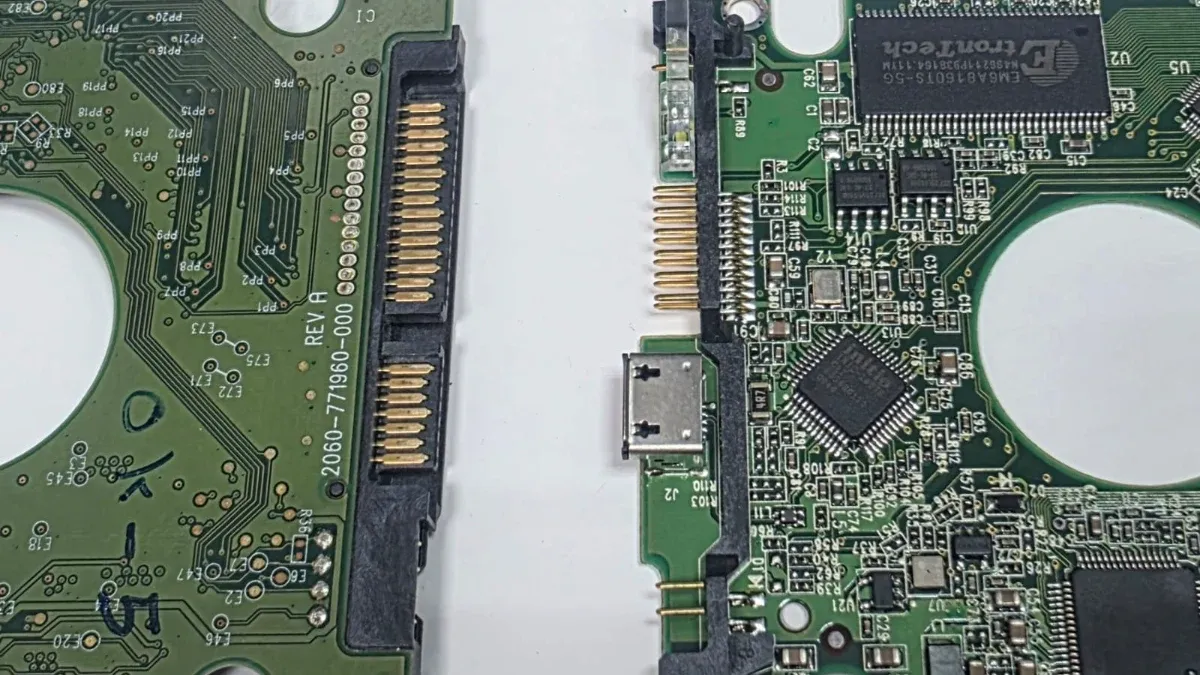
Data recovery from Western Digital portable hard drives presents a major technical challenge when the original printed circuit board (PCB) features an integrated USB interface instead of a native SATA connection. When a drive develops bad sectors or service area (SA) firmware degradation, the onboard USB-SATA bridge chip frequently hangs, causing continuous busy (BSY) status loops and command timeouts.
To overcome these interface limitations, data recovery engineers convert the USB interface to a native SATA connection. This conversion grants direct physical and firmware-level access to hardware diagnostic tools such as PC-3000, enabling vendor-specific commands (VSC), precise reset controls (Soft/Hard Reset), and slow-response firmware patches required to image damaged platters safely.
Why Do You Need a Compatible SATA Board?
The USB mass storage protocol handles sector-read timeouts poorly compared to native SATA. When the drive’s internal system-on-a-chip (SoC) encounters unreadable sectors or corrupted firmware modules, it initiates internal error-recovery routines.
The onboard USB-SATA bridge chip (such as JMicron JMS569 or Symwave/Initio) cannot handle these non-standard response delays and drops the connection or locks up completely.
Converting to a direct SATA connection provides several critical diagnostic advantages:
- Bypasses the bridge controller, eliminating firmware command filtering.
- Restores direct signal timing, preventing operating system interface resets and driver lockups.
- Enables RAM-based head map editing and head-by-head selective imaging.
- Allows firmware module modifications, adaptive parameters adjustment, and Self-Encrypting Drive (
SED) unlocking routines.
How to Find the Right SATA Alternative
Western Digital assigns completely different PCB part numbers to USB and SATA boards even within the same drive family (such as Shasta, FBLite, Palmer, or SpyGlass). Finding a matching donor PCB requires verifying the main processor (SoC), motor driver IC (SM-IC), and RAM capacity match the target hardware specifications.
Instead of random trial-and-error, you can use our SATA PCB cross-reference tool to identify documented board alternatives like matching 2060-701675 or 2060-771959 in seconds.
To ensure full hardware compatibility, evaluate these parameters:
- Verify the matching structural PCB family and revision numbers.
- Match the main processor architecture (such as Marvell
88i9446or88i1054). - Confirm the presence of the external
U12ROM flash chip (256KBor512KBcapacity).
Common Conversions: WD 701675, 771961, and 800022
Converting WD 2060-701675 USB to SATA
The 2060-701675 PCB is a widely used USB board in 2.5-inch Shasta family drives (500GB and 750GB). Two proven methods exist for converting this board:
- Swap to a fully compatible donor
SATAPCB carrying part number2060-701672or2060-771672, then transfer the nativeU12ROM chip. - Convert the native
USBPCB by desoldering the 4 coupling capacitorsC13,C18,C31, andC33to isolate theUSBbridge. Then, solderSATAdata lines to test pointsE71,E72,E73, andE75, and connect ground lines (1,4, and7).
Converting WD 2060-771961 USB to SATA
The 2060-771961 board is common across 1TB FBLite family drives. To establish direct SATA diagnostic access, select one of the following compatible donor SATA PCBs: 2060-771960, 2060-771939, or 2060-771959.
When utilizing a donor board, desolder the original U12 ROM chip from the native USB PCB and solder it onto the donor SATA board. If soldering a SATA connector directly onto the native USB board, remove the 4 coupling capacitors connected to the JMicron bridge to avoid differential signal interference.
Converting WD 2060-800041 and 2060-810012 USB-C to SATA
Modern Shingled Magnetic Recording (SMR) drives from the Palmer and Charger families utilize USB 3.0 board 2060-800041 or USB-C board 2060-810012. The compatible native SATA donor PCB for this generation is 2060-800022 or 2060-800065.
Critical Encryption Warning: On newer SMR families (SpyGlass2, Palmer, Charger), hardware encryption keys are embedded inside the main CPU (SoC). Swapping the PCB and transferring only the U12 ROM will leave the user area completely encrypted. For these drives, engineers must either convert the native USB board by soldering SATA wires directly and removing the 4 capacitors, transfer both the U12 ROM and main SoC, or use specialized unlocked SATA boards designed for hardware decryption handling.
Essential Tools and the ROM Transfer Procedure
Executing board conversions and chip transplants safely requires precise micro-soldering tools and controlled heating equipment to protect heat-sensitive surface-mount components:
- Temperature-controlled hot air rework station set between
300°Cand350°C. - Fine-tip soldering iron with adjustable temperature control.
- Non-acidic liquid rosin flux and gel soldering flux.
- Eutectic tin-lead solder wire (
60/40alloy). - Precision anti-static tweezers (
ESD-Safe). - Stereo inspection microscope (
10x–40xmagnification). - Universal
EEPROMchip programmer supporting1.8Vand3.3VSPI flash chips.
Follow these step-by-step instructions for ROM chip transfer:
- Apply liquid rosin flux across the pins of the
U12ROM chip on the nativeUSBPCB. - Heat the chip evenly using hot air set to
320°Cuntil the solder reflows, then gently lift the chip using precision tweezers. - Clean the contact pads on the donor board and the chip leads using desoldering braid and pure isopropyl alcohol (
99.9%). - Position
U12onto the donorSATAboard, confirming correct Pin 1 orientation against the PCB silk-screen dot. - Solder all leads securely with the soldering iron, then inspect under the microscope to ensure no solder bridges or cold joints exist.
Final Decision and Best Recovery Practices
Select the optimal recovery workflow based on the condition of the native PCB and the drive’s encryption architecture:
- If the native PCB is electrically dead or burnt: Identify the compatible
SATAdonor board number, dump theU12ROM using a programmer, write it to the donor PCB, and migrate the mainSoCif MCU-level encryption is active. - If the native PCB is functional but locks up over
USB: Solder aSATAcable directly to test points (E71,E72,E73,E75) after removing the 4 decoupling capacitors (C13,C18,C31,C33). - Once stable
SATAcommunication is established: Connect the drive to a hardware imager (PC-3000), execute the slow-response firmware fix if needed, build a head map, and extract data sector by sector.
Need professional help?
Our experts at Al-Fares Center are ready to recover your data using state-of-the-art technology with a 95%+ success rate.